
OptiScaler Client, a management tool for enabling upscaling and frame generation technologies in games, has been released in version 1.0.7.
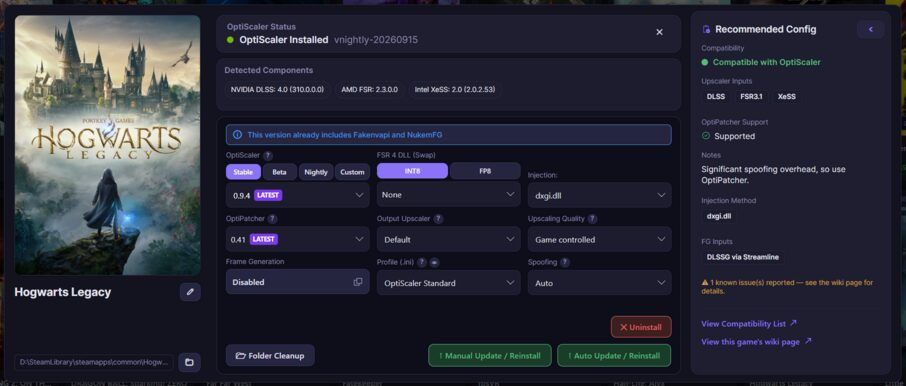
The tool swaps in DLLs like FSR 4, DLSS or frame generation modules on a per-game basis, without needing a manual OptiScaler install.
New in this release is comprehensive FSR 4 DLL swapping with INT8 and FP8 support, plus direct Frame Generation and Multi Frame Generation with multipliers of up to x6.
What’s Changed
“This update introduces a major overhaul with comprehensive FSR 4 DLL Swapping & Imports (supporting INT8, FP8, and custom DLLs without requiring an OptiScaler install) alongside direct Frame Generation and Multi Frame Generation (MFG) support with multipliers up to x6, DLSS Enabler compatibility, and automated Streamline handling.”
Changelog
Added
- FSR 4 DLL Swapping & Imports with INT8 and FP8 support
- Frame Generation & Multi Frame Generation (MFG) with x3-x6 multipliers
- Manage Window enhancements including Output Upscaler selector
- OptiScaler Nightly Builds support
- Experimental features for RenoDx Addons and AMD Neural Rendering
- Settings for Default Versions & Quick Install
Improvements
- Recommended configurations now fetch individual settings from game-specific pages
- Automatic injection method selection based on user testing data
- Luma Unreal Engine compatibility list coverage
- FSR 4 RDNA 3 enhancements
- UI and startup performance improvements
Fixes
- Profile window changes no longer discard on exit
- Software rendering fallback for older Windows 10 crashes
- Touch device window dragging
- High-DPI scaling on displays
- Linux GPU display badge
Source: GitHub