
Heronite, ein Game-Launcher für Windows und Linux, wurde in der Version 1.6.0 veröffentlicht - kurz darauf folgte Version 1.6.1 mit einem Bugfix.
Heronite ist ein freier, in Rust geschriebener Open-Source-Launcher, der Spiele aus verschiedenen Stores in einer Bibliothek bündelt und unter Linux Windows-Spiele per Wine oder Proton startet.
Neu sind unter anderem ein experimenteller Mod-Manager für Linux, GOG-Erfolge ohne GOG Galaxy, HDR per RenoDX sowie neue Metadaten-Quellen und Erweiterungen.
Änderungen in Version 1.6.0:
Highlights
- Metadata sources and extensions: Metadata sources can be turned off, reordered, and configured. New sources include the LaunchBox Games Database and Libretro box art for emulated games. Community extensions can be installed from a list and run in a sandbox, with VNDB as the first
- Safer metadata updates: Several games can be updated at once, with control over fields and sources. Changes can be reviewed and undone, and uncertain matches wait for your approval
- Mod manager (Linux, experimental): Installs mods from Nexus Mods, Thunderstore, archives, or folders, including FOMOD installers. Mods can be toggled and reordered without changing the game folder. Not available in the Flatpak
- GOG achievements without GOG Galaxy: Achievements unlock on Linux and Windows, with in-game notifications. On by default, with a switch on the GOG page
- HDR with RenoDX: RenoDX HDR mods and ReShade add-on build can be enabled per game. Not offered for games with anti-cheat
- Categories: Smart groups are now smart categories, and manual and smart categories share one section in the View menu
Improvements
- Tall, square, and wide covers can each have their own image from SteamGridDB, the web, or a file
- With no game selected, the background can be a solid colour, your own picture, or a random game art that changes every 20 seconds
- Several games can be removed from the Collection at once. Heronite always asks first and never uninstalls them
- Metadata is available in the right-click menu
- Windows: GPU selection per game, Steam launch options, Heroic Games Launcher import, a Cloud saves tab for native games
- Steam games hidden in Steam are imported as hidden
heronite-rs --screenshottakes a screenshot from a key bound in your desktop settings- Performance, stability and compatibility improvements
Fixes
- Console mode Power menu works on Windows
- Backgrounds are sharper, and Darkening 0% shows the art unchanged
- Screenshot, replay, and overlay shortcuts work on Linux desktops beyond GNOME, KDE, and Hyprland, such as niri and sway
- The Guide button no longer gets stuck when another program also holds the controller
- Smart categories: “Any” with no conditions shows every game, and “days ago” uses your local day
- The Mac platform is labelled “Mac” throughout, with no duplicate “Macintosh” filter
Änderungen in Version 1.6.1:
- Play finds Steam again on Windows
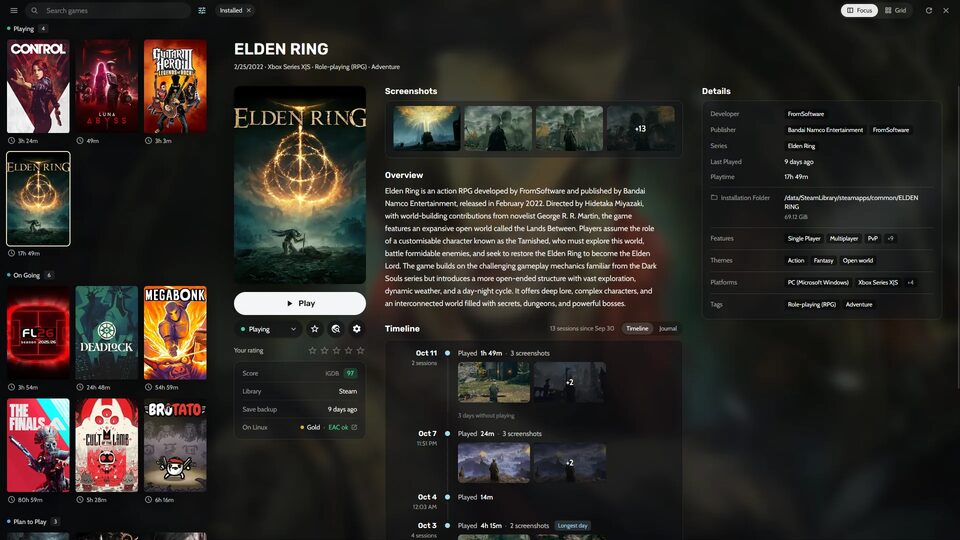
Quelle: GitHub