
Heronite, a game launcher for Windows and Linux, has been released in version 1.6.0 - shortly after, version 1.6.1 followed with a bugfix.
Heronite is a free, open-source launcher written in Rust that gathers games from several stores into one library and runs Windows games on Linux via Wine or Proton.
New features include an experimental mod manager for Linux, GOG achievements without GOG Galaxy, HDR via RenoDX as well as new metadata sources and extensions.
Changes in version 1.6.0:
Highlights
- Metadata sources and extensions: Metadata sources can be turned off, reordered, and configured. New sources include the LaunchBox Games Database and Libretro box art for emulated games. Community extensions can be installed from a list and run in a sandbox, with VNDB as the first
- Safer metadata updates: Several games can be updated at once, with control over fields and sources. Changes can be reviewed and undone, and uncertain matches wait for your approval
- Mod manager (Linux, experimental): Installs mods from Nexus Mods, Thunderstore, archives, or folders, including FOMOD installers. Mods can be toggled and reordered without changing the game folder. Not available in the Flatpak
- GOG achievements without GOG Galaxy: Achievements unlock on Linux and Windows, with in-game notifications. On by default, with a switch on the GOG page
- HDR with RenoDX: RenoDX HDR mods and ReShade add-on build can be enabled per game. Not offered for games with anti-cheat
- Categories: Smart groups are now smart categories, and manual and smart categories share one section in the View menu
Improvements
- Tall, square, and wide covers can each have their own image from SteamGridDB, the web, or a file
- With no game selected, the background can be a solid colour, your own picture, or a random game art that changes every 20 seconds
- Several games can be removed from the Collection at once. Heronite always asks first and never uninstalls them
- Metadata is available in the right-click menu
- Windows: GPU selection per game, Steam launch options, Heroic Games Launcher import, a Cloud saves tab for native games
- Steam games hidden in Steam are imported as hidden
heronite-rs --screenshottakes a screenshot from a key bound in your desktop settings- Performance, stability and compatibility improvements
Fixes
- Console mode Power menu works on Windows
- Backgrounds are sharper, and Darkening 0% shows the art unchanged
- Screenshot, replay, and overlay shortcuts work on Linux desktops beyond GNOME, KDE, and Hyprland, such as niri and sway
- The Guide button no longer gets stuck when another program also holds the controller
- Smart categories: “Any” with no conditions shows every game, and “days ago” uses your local day
- The Mac platform is labelled “Mac” throughout, with no duplicate “Macintosh” filter
Changes in version 1.6.1:
- Play finds Steam again on Windows
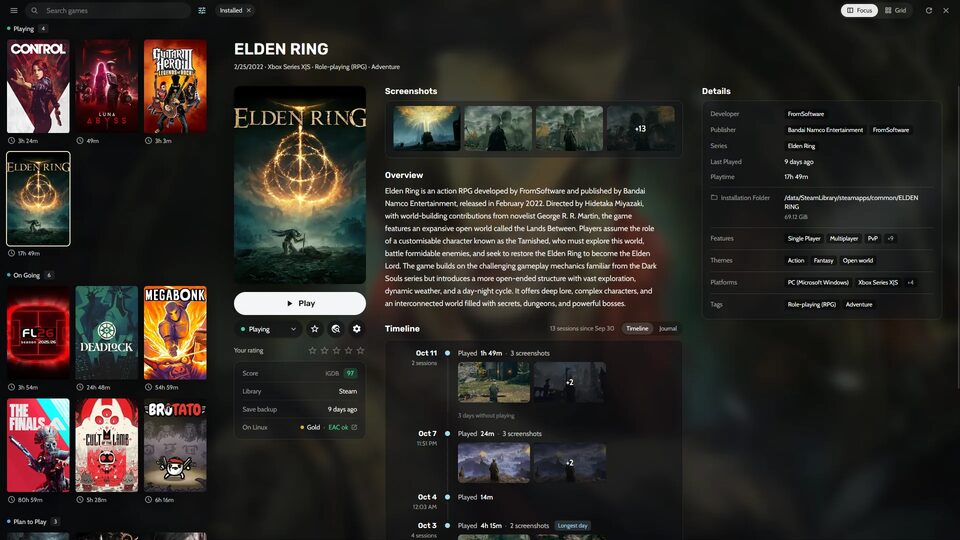
Source: GitHub