
Heronite, a game launcher for Windows and Linux, has been released in version 1.5.0.
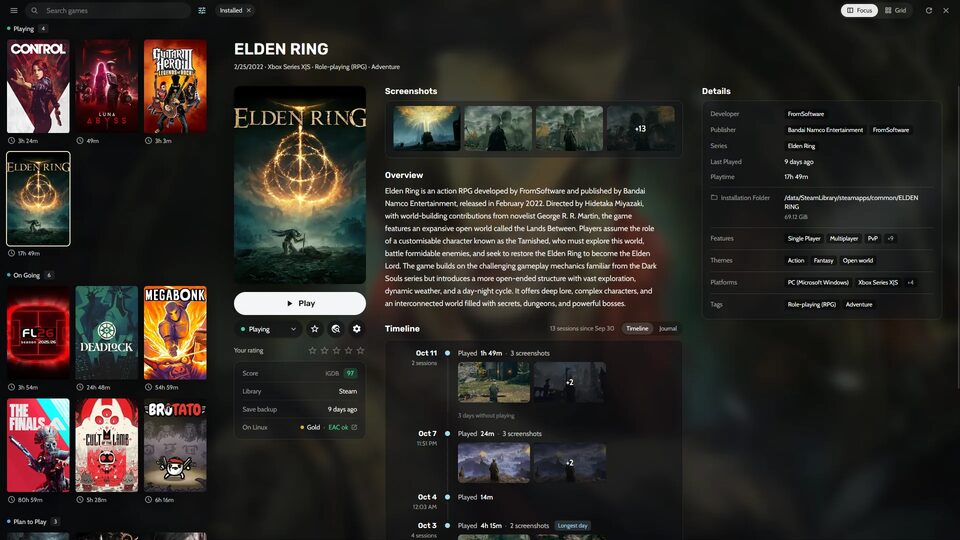
Heronite is a free, open-source launcher written in Rust that gathers games from several stores into one library and runs Windows games on Linux via Wine or Proton.
New features include smart groups, display of Steam Family games, Sunshine/Moonlight integration, mouse support in console mode and Steam sign-in via QR code.
Highlights
- Smart groups: groups of games built from rules (installed, store, time played, last played, rating, HowLongToBeat and more) that keep themselves up to date. Pin them to the header, and use them in console mode too
- Steam Family: games other members of your Steam Family share with you show in the Collection, marked “Family”, with who owns them and whether someone else is playing
- Sunshine and Moonlight: keep your installed games (or only your favourites) in Sunshine, with their covers, so Moonlight can start them from a phone, a TV or another computer. Settings → Integrations
- Mouse in console mode and the overlay: click covers, menus and rows in console mode and the in-game overlay. The cursor hides while you use a controller
- Steam account with a QR code: optionally sign in by scanning a code with the Steam app, so your whole library comes in even when Steam is closed or stuck. Heronite never sees your password, and signing out also ends the sign-in on Steam
- Steam tags: filter the Collection by the tags Steam players gave a game, and see them in its Details
Improvements
- HowLongToBeat times for every game you select, with safer matches and a “Change match” option
- Achievement notices over the game can show the description, rarity, points or XP, type and achievement set, each with its own switch
- Store icons on covers: an optional logo of each game’s store, or a ROM’s emulator, at the corner of its cover
- Smart groups and custom categories sync between your PCs
- A shorter View menu, organized in Filter and Organize blocks
- Console mode goes fullscreen, which you can turn off in Settings → Console mode
- The main window reopens where you left it, on the same screen, maximized or not
- Search images shows SteamGridDB covers and backgrounds when a SteamGridDB key is set
- Games show Steam’s Metacritic score
- Desktop and application menu shortcuts for Battle.net, EA app, Ubisoft Connect and Rockstar Games Launcher on Linux
- Performance, stability and compatibility improvements
Fixes
- Installing a copy of a game that is not its default copy works, and Stop, Uninstall and Settings act on the right copy
- On GNOME, the Grid view’s last column is no longer cut off under the game drawer
- Controllers SDL doesn’t know, such as the GameSir G7 SE, no longer swap X and Y on Linux
- The Collection’s scrollbar covers the whole library, so long libraries scroll all the way to the end
- A game you haven’t played yet has a Journal, so you can write notes for it
Source: GitHub