
OptiScaler Client, ein Verwaltungstool zum Aktivieren von Upscaling- und Frame-Generation-Techniken in Spielen, wurde in Version 1.0.7.2 veröffentlicht.
Das Update folgt zwei Tage nach Version 1.0.7.1 und behebt einen kritischen Deinstallations-Fehler: Der Client hat die FSR-4-DLLs eines Spiels nicht erkannt und amd_fidelityfx_*-Dateien gelöscht, ohne die Originale wiederherzustellen.
Außerdem gibt es ein neu gestaltetes Fenster-Titelbar, Executable-Icons als Ersatz für fehlende Cover und bessere Unterstützung für Handhelds und kleine Bildschirme (u. a. mehr Gamepad-Steuerung und Touch-Bedienung). Unter Linux zeigt die Taskleiste jetzt das Anwendungs-Icon an.
Fixes
- Resolved critical uninstall bug where the client failed to identify a game’s FSR 4 DLLs, resulting in deletion of
amd_fidelityfx_*files without restoring originals- Corrected folder name cleanup issues preventing game compatibility matching
- Eliminated duplicate folder scanning for identical executables
- Addressed Windows taskbar visibility problem when maximized window and auto-hide are both enabled
New Features
- Added README instructions for building OptiScaler from different branches
Improvements
- Redesigned title bar to integrate seamlessly with interface
- Display executable icons as fallback when cover art unavailable
- List view now prioritizes executable icons over cover art for compact presentation
- Linux taskbar now shows application icon during runtime
- Added informational note about FSR 4 DLL swapping without installation
- Enhanced handheld and small-screen support including expanded gamepad controls, improved touch functionality, drag-and-drop window management, and compacted layouts
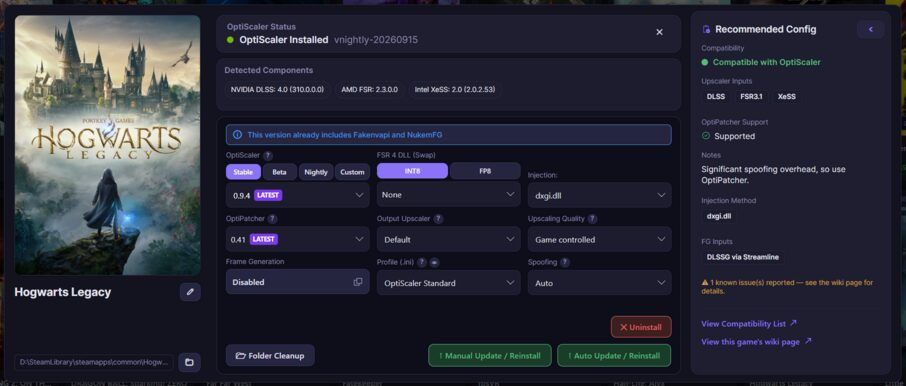
Quelle: GitHub