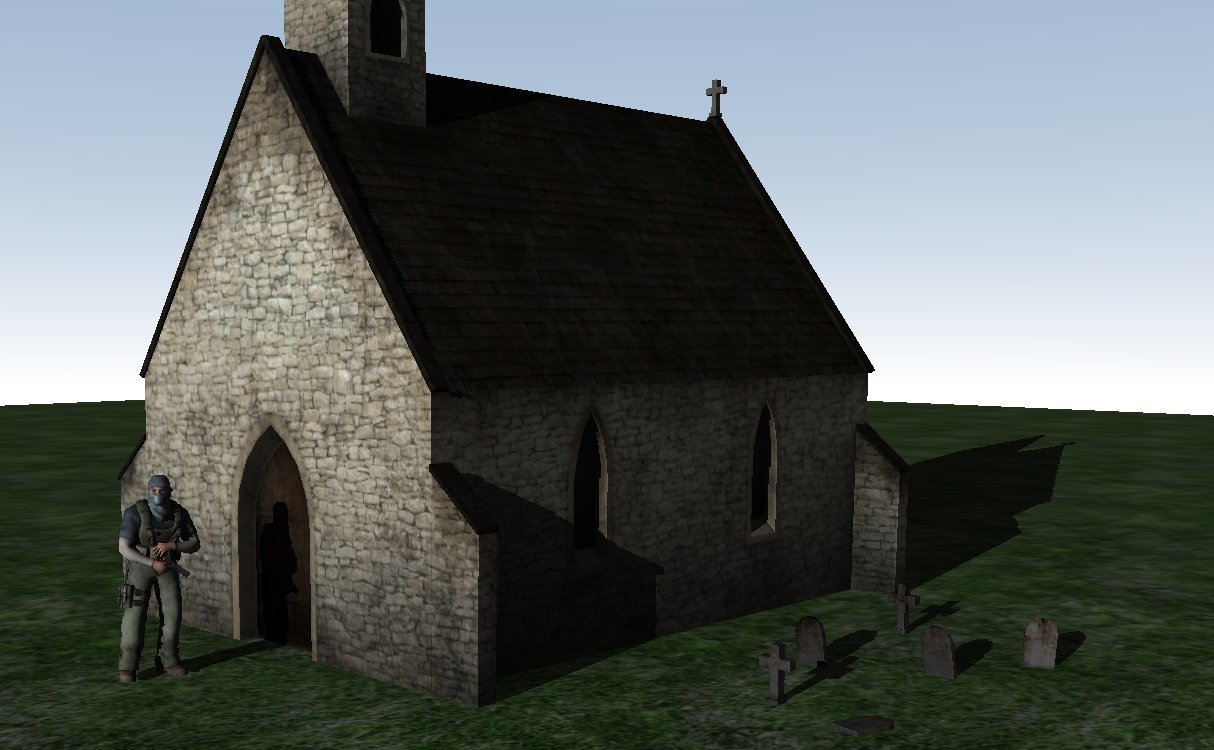
Die neue Version 2017.07.19 von AppGameKit (auch bekannt als AGK2) bringt wieder jede Menge neue Features und Verbesserungen mit sich. Diesmal legten die Entwickler ihren Fokus insbesondere auf den 3D-Teil der Engine. Das Changelog zur aktuellen Version:
AppGameKit 2017.07.19 In this new version of AppGameKit we’ve added some great new commands that bring you significant visual effects. There are now automatic 3D shadows, 3D Particles and normal mapping support. The build includes many fixes and improvements with full details below. Note: This version contains breaking changes, bytecode compiled with older versions will not work with this version, and bytecode compiled with this version will not work with older players. So please update your player apps (iOS player is pending Apple approval). AppGameKit Player Apps The AppGameKit Player on iOS will now display the Wifi IPv4 address over the mobile data one, if available 3D Shadows AppGameKit now supports 3D shadow effects. Shadows are cast automatically from the directional light. There are three different shadow modes you can choose from: Uniform shadow mapping Light Space Perspective shadow mapping Cascade shadow mapping The new shadow commands are; SetShadowMappingMode SetShadowSmoothing SetShadowMapSize SetShadowRange SetShadowBias SetShadowLightStepSize SetObjectCastShadow SetObjectReceiveShadow New tier 1 shadow demo (found in the 3D demo folder) 3D Particles Added 3D particle commands Added a 3D Particle example to demonstrate their usage 3D Added SetObjectNormalMap command to add a normal map to a 3D object that uses the default shaders Added LoadShaderFromString command to specify the shader source code directly as a string Changed the mesh to light distance calculation to prefer closer lights regardless of light range when the number of lights is exceeded If the number of pixel lights affecting a mesh exceeds the limit (currently 4) then the additional pixel lights will be applied to the mesh as vertex lights if possible Added support for tangent and binormal attributes in 3D objects loaded from external files Objects using a normal map that don’t have any tangents or binormals will have them generated at runtime Added normal mapping example project Added support for the vertex color attribute for 3D objects using the default shaders 3D Model formats Upgraded to version 3.3 of the Open Asset Import Library for 3D model loading Currently supported 3D model formats are: .x .fbx .dae .3ds .obj .b3d .3d 2D DrawLine on all platforms will now draw the last pixel of a line whereas previously the last pixel was left blank Fixed DrawBox drawing unfilled boxes incorrectly if the virtual resolution didn’t match the window size 2D Physics Fixed SetSpritePhysicsOff causing a crash if called inside a contact loop using GetFirstContact and GetNextContact Fixed a crash when setting a physics sprite to a width or height of 0 Raw File Paths Fixed LoadVideo not working with “raw:” file paths on non-Windows platforms Fixed LoadMusic not working with “raw:” file paths on all platforms iOS Added RequestAppReview for iOS 10.3 to rate the app from within the app itself Changed iOS splash screen to fade to black instead of white before displaying your app Fixed OpenBrowser on iOS not accepting URLs containing spaces Facebook Added FacebookActivateAppTracking command to send app events to the Facebook app console and record app installs Text Added ShareImageAndText command to share both an image and text at the same time Arrays Fixed assigning default values to an array of strings in a function generating an error if the number of values didn’t match the array size exactly Mac Updated Mac projects to use libc++, any Tier 2 projects will need to update their setings accordingly Multiplayer Fixed spelling mistake in GetSocketListnerConnection command name, this is a breaking change and will need to be corrected in existing apps Fixed network client disconnect not being forwarded to other clients Added SetNetworkAllowClients to restart client listening after calling SetNetworkNoMoreClients Added KickNetworkClient to kick a network client off the network, only the host can do this Strings Fixed ReplaceString cutting off the end of the string if the replace count limit is met Fixed a memory leak in CountStringTokens and GetStringToken Ouya Fixed Ouya Tier 2 template failing to compile Android Fixed Android GameCenter commands crashing if passed an empty string for the leaderboard name Exported Google Android apps should now be compatible with Android TV Fixed ViewFile and ShareImage failing after the first attempt in exported APKs Virtual Buttons Fixed virtual button commands reporting the wrong button ID in error messages Tier 2 Fixed Android ShowCaptureScreen in Tier 2 causing an exception Removed old Visual Studio projects, AppGameKit now only supports VS2015 Support for Visual Studio 2017 has been delayed, we’re awaiting a bug fix from Microsoft to continue support Added a 64-bit template project for Windows using VS2015 Added a 64-bit version of the Windows interpreter to the Players folder, it will not be used automatically to maintain backwards compatibility Plug-Ins Added support for 64-bit plugins in the 64-bit Windows interpreter, 32-bit plugins can only be used with the 32-bit interpreter Added Example Plugin source code to the installed files on Windows, Mac, and Linux Fixed a memory leak when calling plugin commands Debugging Debugging from the AGK IDE will now attempt to use the loopback addres if no other IP addresses could be found Linux Fixed DrawLine on Linux sometimes being off by one Fixed GetResumed and GetPaused not working on Linux Linux apps should no longer exit when a socket disconnects
AGK2 ist eine Multi-Plattform 2D/3D Spiele-Engine und Entwicklungsumgebung für Linux, MacOS und Windows. Programme und Spiele können in einem BASIC-ähnlichem Dialekt oder in C++ entwickelt werden und laufen danach unter Linux, Windows, MacOS, Android, iOS und HTML5. Weitere Informationen zu AGK2: Homepage von AGK2 AGK2 auf Steam Playlist auf YouTube