
Hoard has been released in version 1.3.0.
Hoard is an open-source tool that automatically backs up and syncs game saves across devices, with versioned snapshots, detection of over 20,000 games, and support for numerous emulators.
The new version brings a Decky plugin for Steam Deck Game Mode (notifications, Quick Access panel, manual upload), arrow-key navigation, detection of games added to Steam as shortcuts, and faster uploads. Also, Hoard Cloud has been renamed Hoard One, Pro is now available as a one-time paid year, and there is a Halloween theme (October 24 to November 3).
An easy download of the binaries is available directly at hoard.services/download.
Hoard Cloud becomes Hoard One and Pro can be bought as a single year. The Steam Deck gets a Game Mode plugin, arrow-key navigation and detection for games added to Steam as shortcuts. Uploads get faster and lighter, one file can be pulled out of any old version without restoring it, and sync keeps running on Linux machines that nobody has logged in to.
Added
- A Steam Deck plugin for Game Mode. Gamescope shows no desktop notifications, so in Game Mode nobody could tell whether a save went up or failed. The new plugin for Decky Loader shows a toast when a save is backed up, fails or is restored, and adds a Hoard panel to the Quick Access menu: whether the sync service is running, the latest events, a Manual Upload button and a switch that tells you when Hoard sees a game start or stop. It is not on Decky’s store: each release carries
hoard-decky.tar.gz, and./decky-install.shinside it installs, updates or (--uninstall) removes it.- A year of Pro, paid once. Next to monthly and yearly, Pro can be bought as one payment for twelve months that never renews. The account says when the year ends, an email reminds you 30, 7 and 1 days before, and once it ends Pro stays on for one more month on us before the account goes back to Free.
- Download a version without restoring it. History has a Download button next to Restore: it copies that version’s files into a new folder (in Downloads unless you pick another) and leaves the game’s save folder alone. For when you only want one file back out of an old version.
- Move around the app with the arrow keys. The arrows take you to the nearest button, switch or field, inside the open dialog when there is one, and Enter presses it. Ctrl+Up and Ctrl+Down scroll the page. Handy on a handheld, or with a controller that sends arrow keys.
- Games added to Steam as shortcuts are found. A game added to Steam by hand or by another launcher and run through Proton keeps its saves in a prefix named after the shortcut, which Hoard could not tie to any game, so it was offered with low confidence and automatic mode never tracked it. Hoard now reads Steam’s shortcuts, and the games a launcher such as Unifideck installed, and gives those prefixes their game.
- Halloween, from 24 October to 3 November. Orange all over, a green title bar with a garland, a pumpkin logo and a spider in the sidebar. Settings can turn it off. Outside those dates the app looks as it always did.
- Hoard-help can attach your server’s log. A self-hosted server now also keeps seven days of its log as plain text in its data folder, and an admin sending a report from Hoard-help can attach the end of it, with secrets taken out. It is off unless you switch it on in the report.
- Notifications for downloads from the cloud. Two new switches in Settings: one tells you when a newer version from another machine lands on this one (off by default), the other when a download keeps failing on the same version after its retries. That second one used to follow the backup failures switch, and starts with whatever you had chosen there.
Changed
- Hoard Cloud is now Hoard One. Only the name changes: same server, same account, same Free and Pro plans, nothing to do on your side.
- Faster, lighter uploads. Small files go up sixteen at a time, files that did not change are no longer hashed again on every pass, and when the server offers it a large save file that changed a little uploads only the difference instead of the whole file.
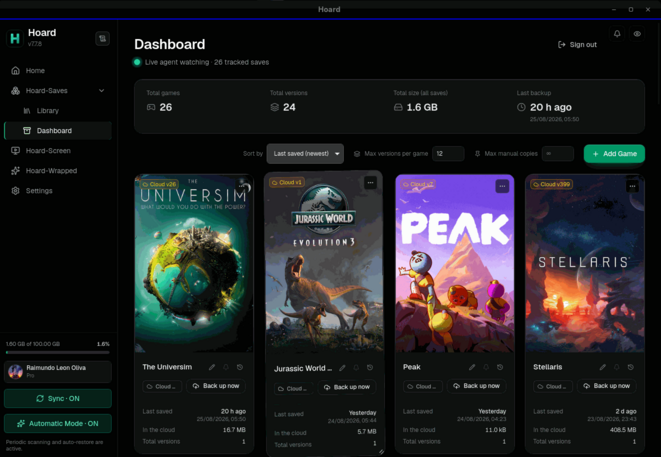
- Panel cards fit the screen. Until you drag a size yourself, the Panel picks the card width that fills its row on that screen, small handheld screens included.
- Hoard One learns which parts of the app get used. Under the same telemetry setting as the error reports, the app notes when it is opened, when a copy is restored by hand and the steps through the Pro screens. Never with your own server, never your files. The setting’s description says exactly this.
Fixed
- “Back up now” did nothing after a run of failures. Once an upload had failed five times in a row the save waited ten minutes, and the button answered OK and waited too. A manual backup now lifts that pause, up to twenty times an hour per save. It never skips a limit set by the server, such as a full account or a “slow down”.
- The app opened and closed at once on some Linux handhelds. On a few GPU and compositor pairs (seen on a Snapdragon handheld under KDE) the window died on its first frame with
Error 71 (Protocol error). The app now notices that error and opens through XWayland, or with simpler rendering, from the next start on. If you setGDK_BACKENDor the WebKit variables yourself, Hoard leaves them alone.- The AppImage would not open in sandboxes such as firejail. Its folders came out readable by their owner only.
- The app could show nothing in the Steam Deck’s Game Mode. 1.2.2 stopped opening it through X11, and since then a Deck in Game Mode could get no window at all. Under gamescope it opens through X11 again, as it did up to 1.2.1.
- The app sometimes switched to the system language. After the window was rebuilt or reloaded, the language picked in Settings could lose to the system’s. The one you picked wins now.
- Sync stayed off on Linux machines where nobody had logged in. The service starts at boot, before any login unlocks the keyring, so it could not read its session and waited for the app to be opened. When the service runs at boot it now keeps a copy of the session in a file only your user can read, and starts without the keyring. A keyring that is still locked, or whose prompt was dismissed, is tried again when you open the app. On image-based systems such as Bazzite, uninstalling gives you the
rpm-ostreecommand instead of failing onrpm -e.- Changing a setting in History could freeze the window for a minute. Every change reloads the sync service, which first asks the server which saves are archived, and for accounts with long histories the server took over 30 seconds to answer. The server answers in a few seconds now, the service only asks for the archived list, and it never waits more than three seconds: it goes by the last answer instead.
- Pro could drop to Free for a moment at each renewal. The subscription was checked at the exact renewal time, and the payment notice arrives a second later, sometimes minutes. In between the account fell to Free, with its goodbye screen and its storage limit. A renewal now has seven days to arrive.
- “Change plan” could start a second Pro subscription. It sent Pro users to the pricing page, where paying again opened another one. The server now refuses a new subscription while one is still being paid, and the account shows the one that is.
Source: GitHub