
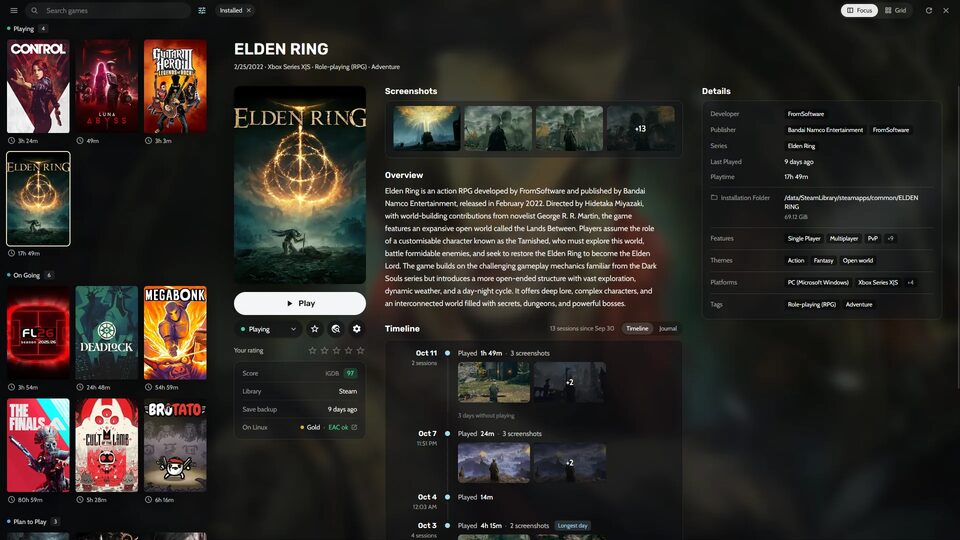
Heronite, ein Game-Launcher für Windows und Linux, wurde in der Version 1.8.0 veröffentlicht.
Heronite ist ein freier, in Rust geschriebener Open-Source-Launcher, der Spiele aus verschiedenen Stores in einer Bibliothek bündelt und unter Linux Windows-Spiele per Wine oder Proton startet.
Nur eine Woche nach Version 1.7.0 bringt das Update einen kompletten Konsolenmodus, Controller-Steuerung auf dem Desktop, die EA-Bibliothek, Xbox-360-Spiele per Xenia, eine PIN für versteckte Spiele und animierte Hintergründe.
Highlights
- A complete console mode: a launch screen and a Now Playing screen while a game runs, and game pages with store media, screenshots, achievements, details, HowLongToBeat and related games. The themes are redesigned (Pulse, Minimal, Cinema and Arcade), and the settings are clear cards with a search
- Controller on the desktop: browse and play with a controller without switching to console mode. The D-pad moves, A plays, B goes back, Y opens Ctrl K, and the right stick moves a pointer
- Your whole EA library: connect your EA account in Stores → EA app to see the EA games you own but haven’t installed. Heronite never sees your password, and only reads your library
- Xbox 360 games with Xenia: Xenia (Edge, Canary or master) is now a supported emulator, for disc images, archives and extracted games
- A PIN for hidden games: Settings → Library can ask for a PIN before showing hidden games. Works with the mouse, the keyboard and a controller
- Animated backgrounds: video and animated GIF or PNG backgrounds, including SteamGridDB’s animated ones. Off by default, in Settings → Appearance
- Whole covers: Settings → Appearance → Covers → Cover fit can show covers whole, so console boxes keep their real shape
- Playnite games move in: games imported from Playnite come with their settings and metadata, and start without Playnite, emulated games included
Improvements
- AntiMicroX profiles per game: pick one profile for each player in the game’s Launch settings, and Heronite loads them while the game runs and closes AntiMicroX after
- Ask how to play: a game with more than one way to start (an emulator or a PC port, online or offline) can ask which one each time you press Play
- Double-click a game to play it
- A sorting name puts a game in its place A–Z without renaming it, in Game settings → Details
- A logo for every game: console mode finds logos for most games, and you can pick one in Game settings → Images → Logo
- Quick launcher: Enter on a running game brings it back to the front on Windows, X11, Sway and Hyprland. It can also open a game’s store page and change its status
- The “Back to game” arrow beside Stop now works on Windows, X11 and Sway too
- SteamGridDB’s image search shows every picture of the right game, adult ones when allowed, and filters them by style
- Ludusavi can back up all of an emulator’s games under one Ludusavi entry, and finds emulated games’ saves under the names emulator manifests use
- Metadata extensions can recognise a game by a product code in its title or file name
- Smoother scrolling on COSMIC
- Store tools (legendary, gogdl, nile and Comet) only run when they match the exact release Heronite expects
- Performance, stability and compatibility improvements
Fixes
- Microsoft Store and PC Game Pass games count their play time
- Games updated in the Epic Games Launcher stop asking for an update on Windows
- Proton games use your MangoHud config, and the overlay’s MangoHud switch works in them
- With a DualSense and Steam Input, each press moves the in-game overlay once instead of twice, and Guide + RB takes one screenshot (Linux)
- The quick launcher opens on the right monitor, at its size and ready for the keyboard, on Windows and GNOME, and its shortcut works when Heronite was started only to launch a game
- Console mode no longer crashes when a game starts from Choose disc or save states
Quelle: GitHub