
Heronite, ein Game-Launcher für Windows und Linux, wurde in der Version 1.7.0 veröffentlicht.
Heronite ist ein freier, in Rust geschriebener Open-Source-Launcher, der Spiele aus verschiedenen Stores in einer Bibliothek bündelt und unter Linux Windows-Spiele per Wine oder Proton startet.
Neu sind unter anderem ein Quick Launcher, Trailer und Screenshots auf den Spieleseiten, eine Controller-Seite, MangoHud im Overlay (Linux) sowie die französische Sprache.
Highlights
- Quick launcher: open the command palette in its own small window from anywhere, even with Heronite in the tray. Set its shortcut in Settings → Quick launcher. The palette now shows game covers and a preview of the selected item
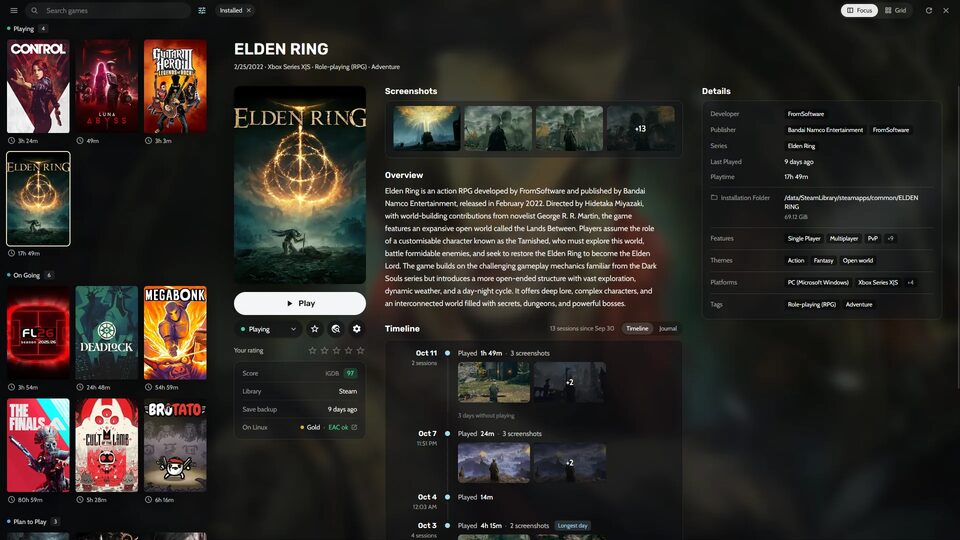
- Trailers and store media: a game’s page can play its trailers and show screenshots from Steam or your other metadata sources, and list its store and site links. Turn them on in Settings → Appearance → Game sections. On Windows, ffmpeg is downloaded the first time a trailer plays
- Controller page: Settings → Controller draws your controller (Xbox, DualSense or Pro Controller) with what each button does in every context. Button icons and the confirm button now follow your controller everywhere
- French: Heronite is now available in French
- MangoHud in the in-game overlay (Linux): show or hide MangoHud and change the FPS limit from the overlay, including in Steam games that turn MangoHud on in their launch options. Games can also start with MangoHud hidden
- Console mode from anywhere: when a controller connects, Heronite can switch to console mode even from the tray or behind another app, now on Windows too. A notice in the corner of the screen shows which button to hold
Improvements
- Pick a random game from Ctrl K: from the games on screen, the installed ones, the ones never played, the favourites or a category
- Change a game’s covers and background in console mode with a controller, from LaunchBox, SteamGridDB and the web
- The Metadata dialog shows covers and backgrounds as pictures, with their size and shape. The Covers dialog shows each picture’s resolution and filters them by source
- Link a game that is not on Steam to its Steam page, and “Unlink” stays unlinked. An optional setting finds such games on Steam by their exact name
- Stores → Steam can stop bringing in the Steam library, and remove the Steam games it added
- Softer navigation sounds in console mode, with a style and a volume
- The overlay’s Home has one Capture row for screenshot, replay and moment
- Back to game: a row in the overlay and an arrow beside Stop bring the game back to the front (Hyprland)
- Epic, GOG and Amazon games imported from Heroic keep their Wine prefix and settings
- Mod manager: Settings → Mods says when 7-Zip is needed to open mod archives, with the command to install it
- Console mode keeps its Library filters between sessions
- Settings fit narrow windows
- Performance, stability and compatibility improvements
Fixes
- Epic games no longer close right after starting when your Epic sign-in has expired: Play asks you to log in again or to play offline this once
- Steam games on a second drive are found when Steam runs from Snap or Flatpak, along with their Proton builds and save restores
- Steam games start even when the desktop can’t open
steam://links, as on Zorin OS- Install with Steam no longer closes the app on Windows
- A game whose move to another drive stopped halfway uses its fully installed copy for its folder, size and saves
- Backgrounds from Lutris use its full background art instead of a tiny banner
- LaunchBox box art fills the square and wide covers of its own shape
- Connecting a Nexus Mods account works again
- Mod downloads work when the file name has spaces or accents
Quelle: GitHub