
Hoard wurde in der Version v1.2.1 veröffentlicht.
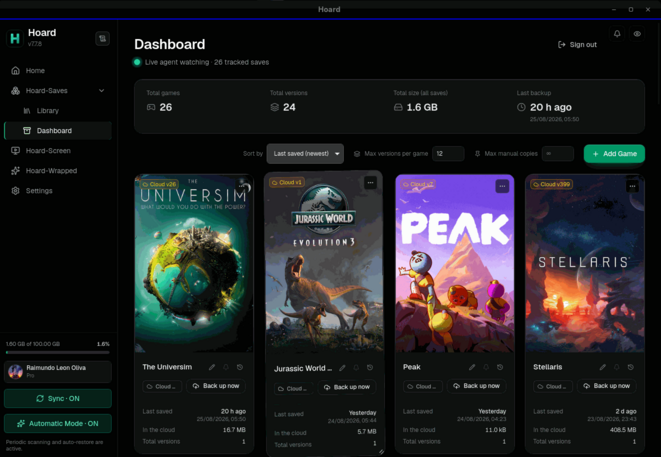
Hoard ist ein quelloffenes Tool, das Spielstände geräteübergreifend automatisch sichert und synchronisiert - mit versionierten Snapshots, Erkennung von über 20.000 Spielen sowie Unterstützung für zahlreiche Emulatoren.
Die neue Version bringt die eigene Titelleiste jetzt auch unter Linux, warnt, wenn ein Ordner kein Spielstand-Ordner ist oder Symlinks enthält, und lädt keine Spiel-Installationen mehr als Spielstand hoch. Neu sind außerdem RetroArch-Savestates (inklusive EmuDeck-Setups), ein Hilfe-Bereich direkt in der App und das Löschen von Spielen aus dem Panel. Hoard Screen wurde entfernt. Zudem wurden Erkennungsprobleme mit Heroic-/Wine-Prefixes auf anderen Laufwerken (z. B. Bazzite) sowie ein Restore-Bug behoben, der einen Spielstand halb überschreiben konnte.
Hoard now can send you emails, a new detection upgrade, removed hoard-screen, the new titlebar in windows now is in linux in this new version.
Added
- The service can write to you. Hoard Cloud ships with transactional email now, sent through Resend, and dark until an operator turns it on. Five situations mail the account - a cleanup that started deleting old versions, an account out of space, a save over its cap, an archived save about to be deleted, and every device on the plan taken - and the export is mailed too. Each email carries a mute link.
- Hoard Cloud enforces its device allowance now, one machine at a time. The plan’s device count (three on Free, Pro unlimited) is imposed behind an opt-in switch (
cloud.devices_enforcein the server config). Devices unseen for 90 days are swept.- Upgrading to Pro stays in the app. The upgrade button now asks the server for a check-out tied to the signed-in account and opens it straight away (€1.99 a month, taxes not included).
- The panel says when a folder is not a save folder. A tracked folder that turns out to be a game’s installation, an installer or repack, or a whole Wine prefix gets a banner saying which, with the save folders Hoard found instead and a button to switch to one.
hoard track --pathprints the same advice.- A warning when part of a folder is a link. Hoard does not follow symbolic links inside a save folder, and used to skip them without a word. The panel says so now, per game, and names the way out: track the folder the link points to.
- RetroArch states, and RetroArch the way EmuDeck sets it up. Save states get an entry of their own, RetroArch States. Both are looked for where
retroarch.cfgsays (savefile_directory,savestate_directory), and the links EmuDeck lays from~/Emulation/savesare followed.- Hoard-help: tell us from inside the app. A page in the sidebar sends a bug report or an idea straight to the Hoard developers, with screenshots, videos or other files and, if you tick it, the latest log lines with your user name taken out of every path.
- Delete a game from the panel. Each card has a bin now. For a game both here and on the server it asks whether to stop tracking it on This machine or to delete every version stored on The server. The files on disk are never touched.
- The export emails of an install can be re-sent (
hoard-admin resend-export-emails), and the web sign-in asks whether you want offers.Changed
- Your own title bar, on Linux too. Linux drops the system bar and shares the same self-painted title bar as Windows. Two ways back to the system bar: a switch in Settings, and automatically under gamescope.
- A game’s installation no longer goes up as its save. On 26 September 2026, 90 of the 3,125 saves on Hoard Cloud had a whole game installed inside them, making up 312 of its 391 GB. A folder that is an installation now backs up the catalogue’s save files plus whatever does not look like the game itself; installers and repacks are skipped; a Wine prefix leaves Windows’ own folders out.
- One game tracked under two names on two machines now syncs. Names are matched to the catalogue’s now, and in automatic mode the twins join through an ordinary restore, with conflict copies for anything the two disagree on.
- The recap (“Wrapped”) and the web nav get a redesign, and detection telemetry keeps the folders you pick by hand.
Removed
- Hoard Screen is gone. The in-game overlay is no longer built or shipped. The Alt+H HUD stays. Pro keeps its 100 GB and unlimited devices.
Fixed
- A game whose manifest names whole files was never offered. Games writing a single save file, such as many under
AppData/LocalLow, came back as installed but with nothing to back up (issue #10). Fixed.- Heroic and Wine prefixes on another disk went unseen. Prefixes are now searched on every mounted drive, including
/var/mntwhere rpm-ostree distros keep them (issue #39, Bazzite), and Heroic’spfx/layout is recognised.- The Linux installer said nothing when you closed its password prompt, and no longer panics before its first frame when the session needs D-Bus.
- A restore could leave a good save half overwritten. A version is now downloaded whole into a staging folder, verified, and only then placed. Replaced files are kept in the conflicts folder, and the sync service holds the save while a restore runs.
- Several web sign-in and email template bugs were fixed.
Quelle: GitHub