
PenguinBurner wurde in der Version v0.8.0 veröffentlicht.
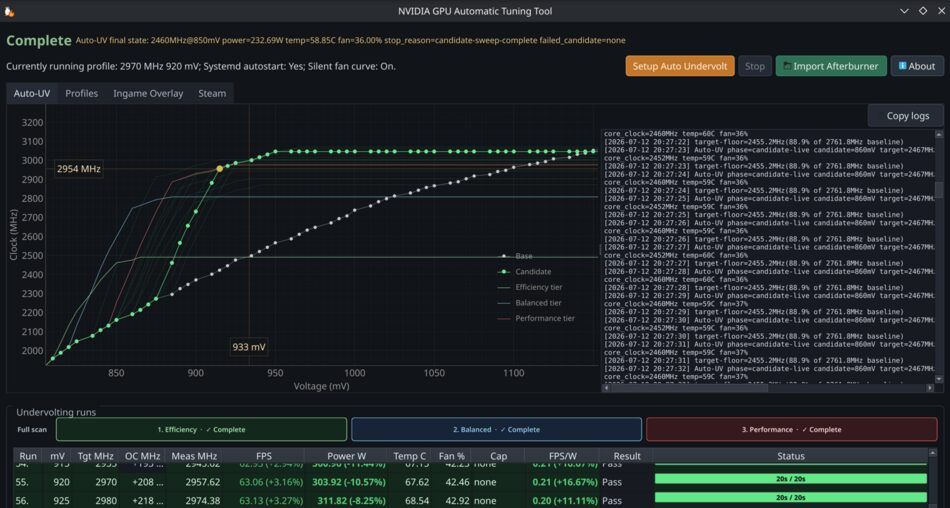
PenguinBurner ist ein Tool zur Verwaltung und Optimierung von Grafikkarten unter Linux, mit Fokus auf Power Management, Undervolting und Performance-Tuning. Kurz zuvor war Version v0.7.9 erschienen.
Neu ist eine Game Library, die Steam und Lutris mit Hintergrunderkennung, Launcher-Badges und Sortierung zusammenführt. Damit lässt sich pro Spiel ein eigenes Power-Profil festlegen, auch adaptive Profile. Dazu kommen glattere Auto-UV-Kurven, Tier-Regler für Spannung, Takt, Speicher-Offset und Power-Limit sowie eine automatische Wiederherstellung nach fehlgeschlagenen Werten.
Thanks to @Ernold11 for the new Game Library, bringing Steam and Lutris together with background discovery, launcher badges and sorting.
Per each game you can have a unique power profile including the adaptive one!
- Smoother Auto-UV curves stay consistent throughout scanning, final verification and profile saving.
- Per-tier controls expose voltage, target clock, memory offset and power limit for Efficiency, Balanced and Performance.
- Lower custom clocks are tested after voltage descent, with bounded searches for GPUs without preset targets.
- Automatic recovery retries eligible safer settings after failed candidates or final checks while respecting crash blacklists.
- Partial results remain available when a later tier fails.
- Adaptive per-game profiles handle FPS caps more consistently and avoid unnecessary tier increases, thanks again to @Ernold11.
Other fixes:
- Clearer profile metrics: absolute FPS/clocks; power percentages against the factory limit.
- Correct live-profile display with the HUD hidden and accurate startup-profile state.
- Stable Auto-UV tab sizing and adaptive timing independent of overlay refresh rate.
- Better Q2RTX installation recovery and Lutris NVAPI-shim handling.
- Preserve game logs and quoted or manually edited launch options.
- Improved distro packaging checks.
Quelle: GitHub