
The Halloween update for the survival adventure Kona has been released for Linux on Steam after more than eight years.
The game moved to Unity 6 with a new render pipeline and brings Vulkan support, Steam Cloud saves, native Steam Deck support, OpenXR for VR and the new, experimental Survivor mode. The old version remains available via Properties > Game Versions > Legacy.
Further updates with bug fixes have been released since this update.
Kona Halloween Update is Out Now (Windows & Linux)!
DISCLAIMER: This update contains a lot of changes and I expect bugs to surface, but I’ll be there to fix them as they reveal themselves, and the Legacy Version is always available to download in the game’s Properties > Game Versions > Legacy.
Release Notes
Game modes and combat
- Added Detective, Balanced, and Survivor modes, with the selected mode displayed beside each save.
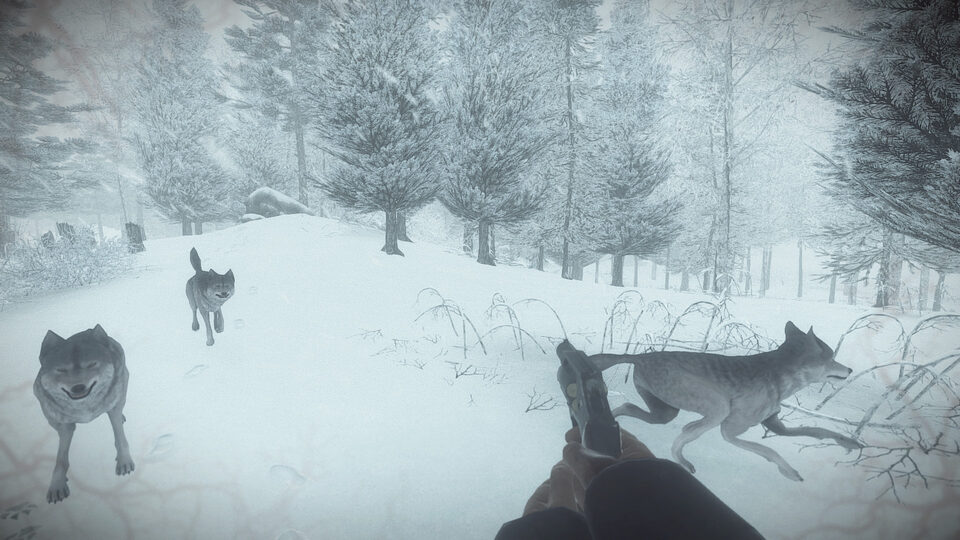
- Added Survivor’s night presentation, storm effects, red interface accents, and additional wolf encounters.
- Added five Survivor achievements in a separate Steam achievement set.
- Added the hidden Golden Gun, with its own unlock conditions and unlimited ammunition.
- Reworked wolf encounters with more space between attacks, clearer preparation before lunging, and revised recovery times.
- Updated wolf retreat behaviour according to the selected mode. In Survivor, living wolves keep fighting.
- Fixed attack-queue issues and cases where a dead wolf could still deal bite damage.
- Fixed wolf navigation failures that could send an animal toward an invalid destination.
- Rebalanced rifle and revolver damage against wolves, including headshots.
- Reduced sprint stamina consumption in Balanced and Survivor modes.
- Made the time from firing input to shot much shorter.
Performance and graphics
- Updated Kona’s engine and rendering pipeline.
- Reworked terrain, scenery, and texture loading, with improvements to visibility management and background loading.
- Reduced repeated object searches, unnecessary per-frame work, and memory allocations in several gameplay systems.
- Spread scenery spawning and visibility updates across frames to reduce sudden bursts of work.
- Updated shader preparation to reduce first-use rendering stalls.
- Expanded graphics settings and frame-rate limits, including 72, 80, and 90 FPS options, mainly for VR.
- Added experimental NVIDIA DLSS and AMD FSR 2 upscaling for supported Windows hardware, disabled by default.
- Added optional volumetric lighting and GPU snow particles on supported configurations.
- Updated snow, water, fog, and material rendering for the new pipeline.
- Fixed colour-grading and exposure issues, including incorrect transitions between lighting conditions.
- Restored missing effects on vision characters and glowing footprints.
- Improved motion-blur support for moving objects and held equipment.
Menus, reading, and controls
- Reworked settings navigation, controller focus, and confirmation dialogs.
- Fixed pause-menu backgrounds intercepting input intended for submenus.
- Fixed cases where menu transitions could become stuck while the game was paused.
- Improved save-slot readability and added clearer mode labels.
- Added page indicators and previous/next arrows when reading documents.
- Fixed document-navigation clicks also triggering unrelated gameplay input.
- Fixed settings panels reopening at an old scroll position.
- Fixed notification cleanup and several input and interface errors.
- Improved movement input handling at high frame rates.
VR
- Replaced the legacy VR integration with OpenXR.
- Added revised hand poses, support-hand grips, and left- or right-handed item handling.
- Added physical steering-wheel interaction, with stick steering still available.
- Improved firearm aiming and reloading, including partial reloads for supported equipment.
- Improved journal navigation, document handling, and Polaroid positioning.
- Improved menu pointers, interaction markers, subtitle readability, and recentering.
- Fixed several loading and fade issues that could reveal the world too early or leave interface elements in the wrong place.
- Improved teleport landing checks around steps and obstacles.
- Added separate PC VR preferences so switching between desktop and headset play preserves each setup.
Saves, achievements, and other fixes
- Added Steam Cloud saves, allowing you to continue your investigation across computers and Steam Deck, with your checkpoints and journal photos synchronized.
- Added a migration prompt for older saves, with recovery backups created before importing them.
- Improved checkpoint and photo saving, including recovery copies and safer handling of interrupted writes.
- Fixed unreadable checkpoints preventing other saves from being listed.
- Fixed save triggers failing to retry after an unsuccessful save.
- Improved achievement delivery and retry handling when Steam is temporarily unavailable.
- Fixed water incorrectly counting as alcohol for the Prohibition achievement, with recovery handling for eligible older saves.
- Fixed road sections disappearing when travelling between certain loading regions.
- Improved restoration of indoor context when loading a checkpoint.
- Fixed radio playback initialization and several animation-state errors.
Source: Steam