
Heronite, a game launcher for Windows and Linux, has been released in version 2.0.0.
Heronite is a free, open-source launcher written in Rust that gathers games from several stores into one library and runs Windows games on Linux via Wine or Proton.
The major release arrives shortly after version 1.7.0. New are community add-ons and themes for desktop and console mode, importing from Lutris, Bottles and Faugus as native Heronite games, Eden support (Switch), a Steam ROM Manager importer, trophies for RPCS3, shadPS4 and Xenia and Simplified Chinese.
Highlights
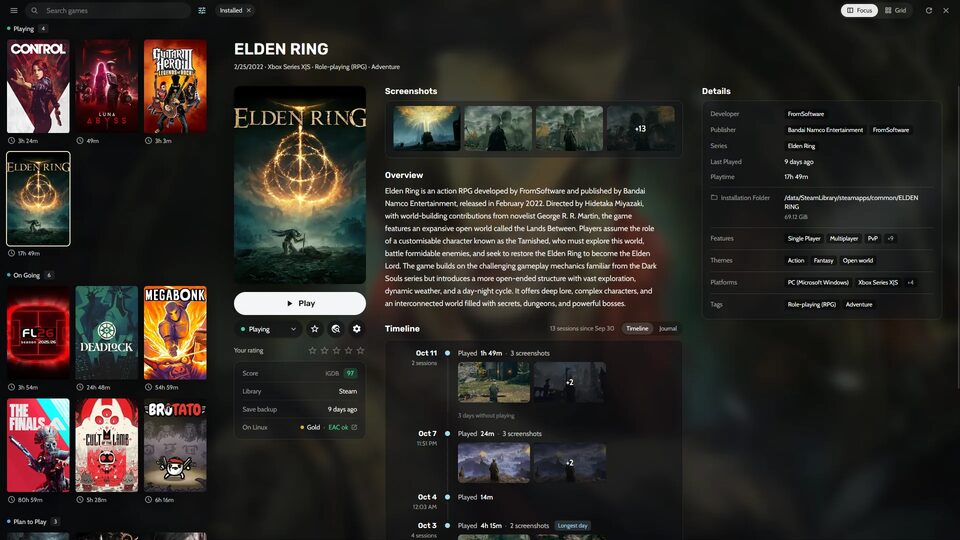
- Community add-ons and desktop themes: Heronite now has an open add-on ecosystem backed by heronite-addons, where each add-on lives in its author’s repository. Desktop themes can customise colours, fonts, icons and full declarative layouts for the library, game page, cards and drawer. Browse and install them from ☰ → Themes, from a
.heronite-themefile, or straight from a Git repository URL. Ships with three official showcase themes: Frosted Glass, Bento Grid, and Classic Client- Community console themes: share and install console themes as
.heronite-console-themepackages from Settings → Console mode (with previews, source info and one-click updates), or build your own in the editor and pack them withheronite-rs theme pack. Console themes also gain a cover-flow carousel with reflections and game cases, a corner hint panel, coloured glyphs, and custom background images- Move in from Lutris, Bottles and Faugus: a new Start them here, without {launcher} switch in Settings → Other launchers turns imported games into native Heronite games with their runner, prefix, arguments and environment variables intact
- Emulation upgrades (Eden, SRM and ROM versions): native Eden (Nintendo Switch) support, a Steam ROM Manager importer with SRM-style ROM globs, and the ability to merge multiple ROM versions or romhacks into a single card and pick which one to play
- Emulator trophies and achievements: view achievements and trophies unlocked in RPCS3, shadPS4, and Xenia
- In-game overlay media controls and controller batteries: control music or video playback straight from the overlay, and see accurate wireless battery levels on Windows for third-party controllers (ported from BatteryHub)
- Simplified Chinese (简体中文): full interface translation across desktop and console mode
Improvements
- Console mode navigation sounds: new Classic and Retro sound packs (on by default), configurable from Quick changes
- Console mode Grid wide covers: Grid’s right-hand panel can now show the game’s wide cover instead of a cropped background
- Grouped copies in console mode: a game owned on several stores now appears once in console mode (by its default copy), with a Default copy selector on the game page
- DLsite metadata source: unofficial DLsite metadata add-on in the Heronite list, matching games automatically by their product code (
RJ/RE/BJ/VJ)- Custom GitHub Proton sources: add your own GitHub Proton repositories in the Wine Manager
- Install folder per store: choose a default install folder individually for each store
- Start Steam in the background: launches Steam silently when starting a Steam game so its window doesn’t cover the game (on by default)
- Choose which monitor Heronite opens on: pick a specific screen in Settings → General → Window (and in console mode settings)
- External uninstall and offline-drive detection: Heronite detects games uninstalled outside the app while keeping games on disconnected/unmounted drives marked as offline instead of removing them
- Theme authoring tools:
heronite-rs theme new,check,pack, and--theme-devlive reload for creating desktop and console themes- Smoother rendering on Linux: improved Wayland/GPUI frame pacing and off-thread theme loading
Fixes
- EA & GOG sign-in and Epic errors: fixed EA sign-in (“Service limitations apply”), fixed GOG login past its new check, and improved Epic/GOG/Amazon error reporting and automatic retry on interrupted Epic library refreshes
- Rockstar & Epic games (
USE_FAKE_EPIC_EXE): games that check forEpicGamesLauncher.exe(such as GTA V, Red Dead Redemption 2 and Returnal) now launch properly- Steam launch timeout: Heronite keeps waiting while Steam is actively downloading updates, shaders or runtimes instead of timing out after 90 s
- MangoHud: preserves your GOverlay/MangoHud FPS limit and per-game configs, and lets the overlay toggle/limit Epic games mid-session
- Proton store clients: automatically downloads
umubefore setting up or opening store clients, fixes versioned EA app folders, Battle.net cold launch flags and stale folders, and Windows path arguments- In-game overlay: fixed Triangle/Square mapping on PlayStation and Nintendo controllers on Linux, and fixed the overlay opening on the wrong monitor on Windows
- Game replays: fixed “game” sound mode recording audio again (including PipeWire and Steam games)
- Console mode on handhelds: fixed menus and panels overflowing the screen in SteamOS Game Mode and at higher interface scales
- Windows fixes: fixed stale single-instance sockets after a crash or forced restart, fixed “From the desktop” reading Windows accent colours, and fixed multi-DPI window scaling
- Collection & emulation: fixed a startup crash on UTF-8 characters in Steam descriptions, made pinned group headers clickable to fold groups, and fixed custom emulator profiles showing under their real platform instead of “Other”
Source: GitHub