
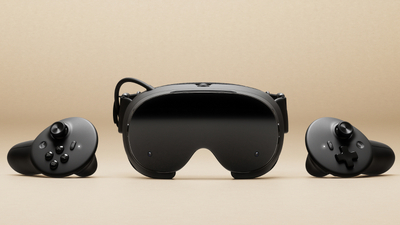
Valve has published news about the Steam Frame VR headset on Steam: info on reservation timing, CAD files and a summary of the software updates shipped since launch.
Reservations will be fulfilled by December 2026 or in 2027, shown on the product page. The CAD and electrical interface files are available for non-commercial use. The updates bring up to 12% better battery life and streaming improvements, among other things.
Reservation updates and timing
We opened up signups for Steam Frame on September 14th, and did a one-time randomization of that list on September 17th. Based on the order in which folks landed after that shuffle, we began fulfilling orders on September 18th.
If you have a reservation: You can now check on your expected order window by going directly to the Steam Frame product page while logged in to your Steam account. Once there, you will see confirmation that you will receive your order email either by December, or in 2027. Those in the 2027 camp will receive further (more detailed) information on their expected order timing by January. For everyone receiving a purchase email: You must complete your purchase within 72 hours or we will move to the next person in line.
If you are on the waitlist: As we work our way through the reservation queues, we will let you know if spots open up there. Anyone interested in purchasing Steam Frame can still join the waitlist, and will be placed at the end in the order they join. Please note that there are separate queues for each region, so there could be some regions pulling from the waitlist sooner than others. Importantly, no one on the waitlist is leapfrogging over anyone currently holding a reservation; we are only dipping into waitlists in a region when we reach the end of its reservation queue.
CAD and electrical interface files
Steam Frame CAD files and electrical interface information are now available for non-commercial use. For commercial use, please follow the instructions at the link and reach out to us.
Steam Frame Software Updates
Power:
- Improved power efficiency and battery lifetime during both streaming and local gameplay, with gains of up to 12%. Results vary depending on framerate and content.
- Added user setting to control Presence Sensor Sensitivity (VR Settings -> Startup / Shutdown -> Presence Sensor). New “high sensitivity” option keeps displays on under a wider range of conditions, such as when using glasses spacers.
Streaming:
- Improved color clarity during VR streaming
- VR streaming reliability improvements, including fixes for “Error 17”.
- Fixed steam frame wireless adapter connectivity issues that affected users in some countries.
- Improved audio reliability while streaming.
- Fixed rare cases of other network interfaces causing disruption of wireless dongle connection.
- Spectator view now uses smoother motion, by default.
- Fixed the keyboard not appearing while streaming.
General:
- Fixed an issue that prevented controller bindings from loading for certain games, including Google Earth VR and Thumper.
- Improved focus behavior when interacting with grab/resize handles
- Improved focus handling and gamepad navigation in the dashboard.
- Fixed a case of dashboard panels flickering.
- Fixed “Return to Gaming mode” when starting up directly into Desktop mode.
- Added option to disable spectator view smoothing under VR Settings > Developer (in headset).
- Fixed an issue where the dashboard would recenter unnecessarily for some users.
- Updated embedded browser (CEF) with crash fixes and Linux H.264 detection fixes.
- Miscellaneous performance and stability improvements.
Audio:
- Audio downmix and binaural rendering now have matching volume across all formats.
Accessibility:
- Added accessibility option for users who want to limit eye tracking to a single eye. VR Settings -> General -> Track Dominant Eye Only. (requires enabling “show advanced settings”)
- Users can now specify their Dominant Eye in VR Settings. This controls which eye is used for spectator view, screenshots, etc.
Steam Client updates:
- Improved color accuracy when streaming non-VR games from a Windows PC
- Support for “Show Battery Percentage” in Dashboard Bar
- Support for gamepad navigation in the Streaming menu
- Streaming Menu shows spectating status, and a stop button.
- VR Quick Access Menu opens on click (instead of hover)
- Steam Frame Wireless Adapter manual configuration now shows the correct list of Wi-Fi channels in all regions.
Source: Steam