
ShelvesHub, a background service that integrates Deck Shelves into Steam, has been released in version v0.1.0.
ShelvesHub brings Deck Shelves’ shelf actions - “add to shelf”, highlight and hide - straight into a game’s context menu in Steam, and hosts the required data backend locally.
The service updates itself, keeps Deck Shelves up to date automatically, and ships its own installers for Linux, macOS, Windows and SteamOS.
- Shelf actions work in the game menu on the Steam Beta. When ShelvesHub is hosting on its own, the “add to shelf / highlight / hide” items now appear in a game’s context menu on the Steam Beta client, just as they do elsewhere.
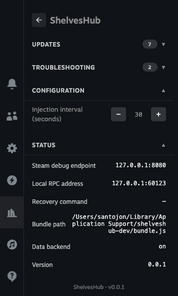
- A native tab that looks the part. The host’s Quick Access tab now renders real Steam buttons and toggles — with a gamepad focus ring and a ShelvesHub icon that tints to your theme — so it feels like the rest of the interface.
- Click to install. Double-click installers for macOS and Windows, each with the ShelvesHub icon, alongside the one-click scripts for SteamOS, Linux, macOS and Windows.
- Updates itself. When a newer ShelvesHub is available, the host can download and verify the new version, swap its own binary in, and restart the service to finish — or tell you to restart when it can’t. No reinstall, no manual copying.
- Keeps Deck Shelves current on its own. With automatic updates on, the host periodically checks for a newer Deck Shelves on your chosen channel and, when it finds one, downloads it and reloads.
- Plays nice with another host. If Deck Shelves is already mounted by a different host on the same machine, the service never loads it twice or takes over — it adds only its own Quick Access tab alongside.
- Deck Shelves, right in the Steam menu. This host’s own Quick Access tab opens the Deck Shelves editor directly — validated on a Steam Deck.
- Logs you can actually read. The Logs view shows one stream — the host runtime and the service together, newest first — with each line tagged by level and category and colour-coded, plus a refresh control.
- One-click install on Linux, too. A double-click desktop installer for Linux joins the SteamOS one.
Source: GitHub