
Valve has published another guide for the Steam Controller: this time it’s about Grip Sense, the capacitive touch sensors inside the controller’s handles.
Grip Sense detects whether your fingers are touching the marked spots on the grips, and its main purpose is quickly enabling or disabling Gyro (“ratcheting”) - for example to recenter your aim once you’ve turned past your comfortable range. The activation threshold is fully adjustable, from a slight lift of the fingers to taking your whole hand off the grip. Grip Sense can also be used to bring up weapon wheels, maps, or menus by releasing the grips.
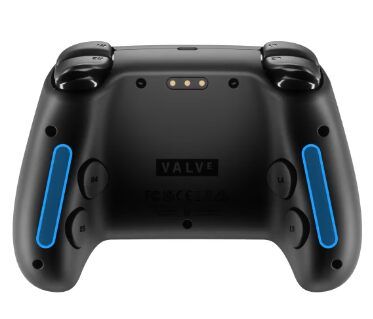
Grip Sense is what we’re calling the two capacitive touch sensors inside the handles of Steam Controller. They sense when your fingers are touching the locations highlighted in the image below. […] our driving motivation in building these was to provide another way to activate/deactivate Gyro quickly when you’ve moved it past your comfortable zone and need to recenter it (called “ratcheting”).
Shortly before this, Valve had already published a guide to Gyro. It covers the three gyro modes (Gyro to Mouse, Gyro to Joystick Camera, Gyro to Joystick Deflection), setting up activation buttons, and drift calibration for the built-in gyroscope.
Source: Steam