
volt-gui wurde in der Version 2.4.1 veröffentlicht.
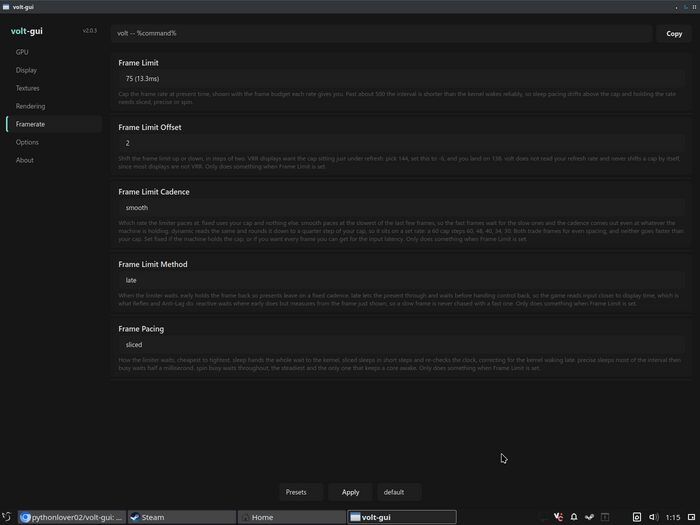
Kurz nach dem größeren Umbau in Version 2.4.0 bringt dieses Update vor allem Verbesserungen an der GUI: Comboboxen für Settings, Presets und Profile wurden durch Slider ersetzt, der Beschreibungstext ist heller und damit besser lesbar, und der Frame Limit lässt sich nun in einzelnen Schritten von 1 bis 1000 einstellen.
2.4.1 is a small fix over the 2.4.0 release, mostly changing the GUI side for a cleaner experience (in my opinion, just in case). The most important changes are:
- Settings, presets and profiles are sliders now instead of comboboxes, so no more giant lists going across the whole screen.
- Description text is a bit lighter, it was too dark to read comfortably.
- Removed the icons from the dialogs, warnings and errors.
- Frame Limit Offset is gone, Frame Limit now goes from 1 to 1000 in steps of one, so you can set the exact cap you want.
It isn’t perfect, and I know a slider based GUI is a bit weird, but I think it does the job for now, and you aren’t missing any of the values.
Why sliders and not something like
- [value] +?With a slider you can go from 0 to 600 fps in one drag, while with buttons you’d be clicking one by one. And comboboxes have their own problem, a giant list that takes up the whole window, and you can only pick what’s in it.
I also moved everything to sliders, not just the numbers, because I like things to be cohesive when possible. Otherwise it kinda ticks me off :)
Quelle: GitHub