

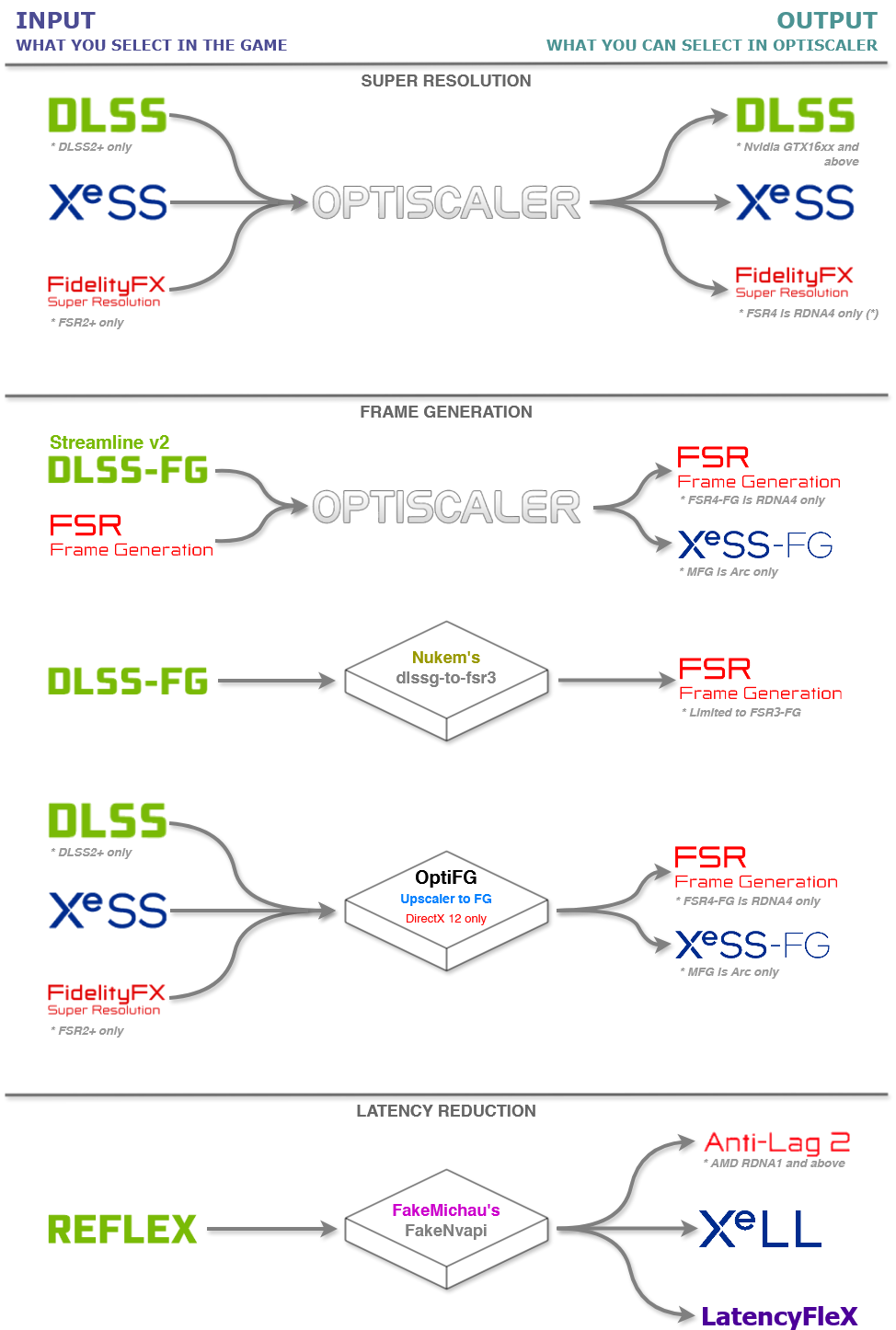
OptiScaler, a compatibility layer for upscaling and frame generation technologies like FSR4, DLSS and XeSS, has been released in version v0.9.5.
This is the final release of the 0.9 branch, which now enters Maintenance Mode: bug reports for it will generally no longer be addressed, as development focuses on Opti v10. The update brings the FFX 2.4 SDK with FSR 4.1.2, official RDNA2 and APU support and native FSR4 Vulkan support (still WIP). FSR-FG 4.0.2 now uses HW Flip Metering on RDNA4 (AMD driver 26.10.1 or newer). On Linux, a recent Proton with the latest VKD3D commits is required.
One final (packed) release for the Maintenance branch
While this release brings quite a few new features and loads of fixes since 0.9.4, including FFX 2.4 SDK support, it also marks the end of active development for the 0.9 branch. Going forward, 0.9 will be considered in Maintenance Mode and provided as is. With that in mind, bug reports for the 0.9 branch will generally no longer be addressed. All development efforts are now focused on polishing Opti v10.
Fun stats - TOTAL 2 MILLION downloads, ~13.000 stars, ~720 confirmed working games, over 210 supported OptiPatcher games
What comes bundled:
- OptiScaler 0.9.5-final - Signed build
- Fakenvapi 1.4.1
- Nukems dlssg_to_fsr3 0.130
- FFX 2.4 SDK - FSR 4.1.2 (now with official RDNA2 and APU INT8 support), FSR-FG 4.0.2
- XeSS 3.0.2 SDK (upscaler still reads 2.0.2, MFG is still Arc only)
New and improved MAJOR features in 0.9.5:
Updated to the latest FFX 2.4 SDK
- Now using FSR 4.1.2 upscaling which brings official support for RDNA2 and Ryzen APUs/iGPUs (some exclusions apply), as well as native FSR4 Vulkan support
- Unsupported GPUs can still force it with
Fsr4ForceEnableInt8option in OptiScaler.ini, e.g.Fsr4ForceEnableInt8=3to force INT8 Lite model- Native FSR4 Vulkan is still WIP, w/Dx12 interop might still be better in some games, especially for non-RDNA4 GPUs
- Added an FSR4 model selection drop down menu with active model readout
- FSR-FG now updated to 4.0.2 with HW Flip Metering support for RDNA4 with better frame pacing (requires AMD 26.10.1 driver at least)
- FSR4-FG Vulkan support has NOT been implemented, and remains a feature ONLY in OptiScaler v10 Nightlies
- Added live FSR 4 watermark toggling - no longer required to restart the game
- Replaced FSR4’s autoexposure with our own - mainly fixes DLSS inputs in UE games (flickering black screen on Linear input)
- Updated FSR3.1 Dx11 libraries - fixes blurry artifacts
- Added auto AgilitySDK enabling logic for W10 - should help FSR4 Win 10 users with crashing
- Added device check for DLSS init - fixes some DLSS related issues, especially regarding DX11 and Luma mods
- Updated XeSS SDK to 3.0.2, fixed XeFG crash with latest Intel drivers
- Fixes to the DX11 resource management - fixes memory leaks (easily triggerable in System Shock Remake)
- Fixed Menu hooking - fixes a major performance deficit observed first in Watch Dogs 2
- Fixed broken motion vectors in Enshrouded
- Added Extended Search quirk, applied it for Phantom Blade Zero
IMPORTANT REGARDING FSR4.1.2 INT8
- Unsupported GPUs will need to force INT8 support with
Fsr4ForceEnableInt8option in OptiScaler.ini.- RDNA4 uses the FP8 model (shown as FSR4-Upscale), RDNA3 FSR4-i8, RDNA2 FSR4-i8-2 and the APUs FSR4 Lite (shown as FSR4L-i8)
- All unsupported GPUs fall back to the internal FSR3 upscaler! Check the FSR4 Upscaler Watermark (FSR4, FSR4-i8, FSR4-i8-2, FSR4L-i8 or FSR3), either under the Upscaler selection or by setting
Fsr4EnableWatermark=truein OptiScaler.iniRegarding FSR4 VK w/Dx12 on Linux
DX12 interop should now be more or less irrelevant since native FSR4 Vulkan support is available with FSR 4.1.2
Requires Proton 11+, RADV may have a massive performance drop compared to AMDVLK (unrelated to OptiScaler)
Linux users need the latest Proton which includes latest VKD3D commits which support FSR 4.1.2/FFX SDK 2.4 in order to work
FSR4-FG requires Mesa 25.2+ and Wine prefix set to Win 11 (per-game, if global config isn’t working)
There is no official OptiScaler website and no official manager app. Only legit places are the GitHub repository, the Discord server and Nitec’s NexusMods page. OptiScaler is FREE, any kind of monetary requirements are scams!
Source: GitHub