
StoryScreen has been released for Linux on Steam.
The tool is a digital, system-agnostic game master screen for tabletop RPGs, used to plan campaigns, project maps and encounters, and play music. It costs €17.92, with a 20% launch discount (€14.33). It works fully offline, has no subscription, and stores data locally.
StoryScreen is a digital, system-agnostic, offline GameMaster’s screen. Plan your adventures, establish plot, quests, NPCs and many more in a clear timeline flow. Play themed music from local files or stream from YouTube using the in-built music console. Resolve encounters using the map viewer. Cast the visuals to external screens or directly to your players’ mobile devices. All this so you can focus on running your story without the need to constantly flip through your notes.
Features
- 100% offline: Buy once, own forever. No subscriptions. No premium features. Data stored locally.
- Campaign organizer: Build your campaign with plots, quests, items, locations, characters and many more. Link them to track progress and connections.
- Digital library: Design items, encounters or quests, store them as templates and reuse in other campaigns or systems.
- Music console: Organize your music into themes and switch between music themes with a single click.
- Player projection: Project encounters, maps, or images for the players onto secondary screens or stream it in the local network.
- Advanced encounter viewer: Character tokens, full fog of war support, measurement tools, drawing tools and CAD-like geometry.
- Multi-format support: Still map images, UVTT files as well as animated maps with .mp4, .webm, .gif formats.
- Relations viewer: A graph-like relations viewer automatically creates the web of connections for you.
- Entry editor: A markdown-based editor, fully compatible with obsidian, together with wikilink type connections.
- Additional helpers: A dice roller and a rules tab for often consulted rules.
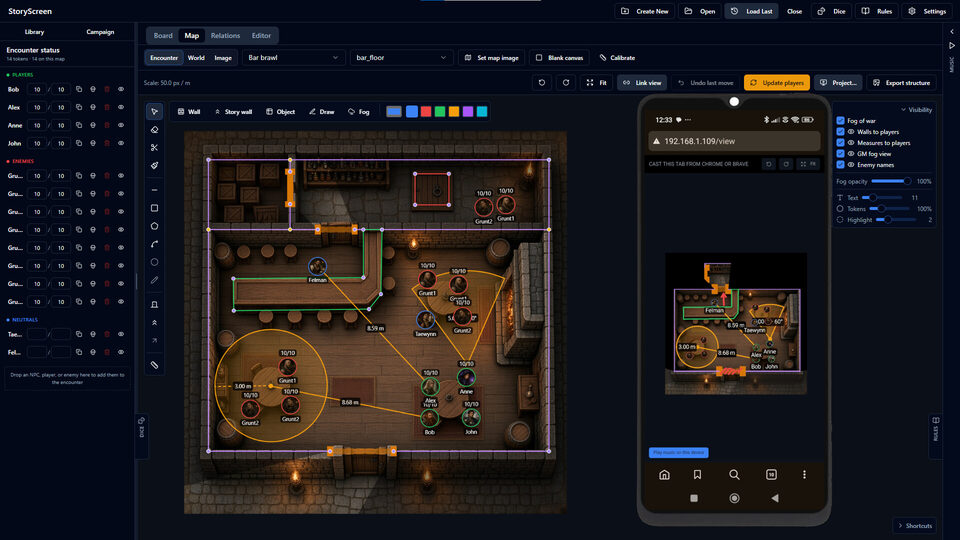
Source: Steam