
Local Realm is now available for Linux on Steam.
The tool is an offline-first worldbuilding knowledge base that lets writers, game developers and TTRPG game masters link characters, locations, factions, timelines and maps - with no account, subscription or cloud. It costs €10.25.
Shortly after launch, version 1.1 already arrived as a QOL update with a family-tree layout, more formatting options, tables, undo for deleted entries and much more.
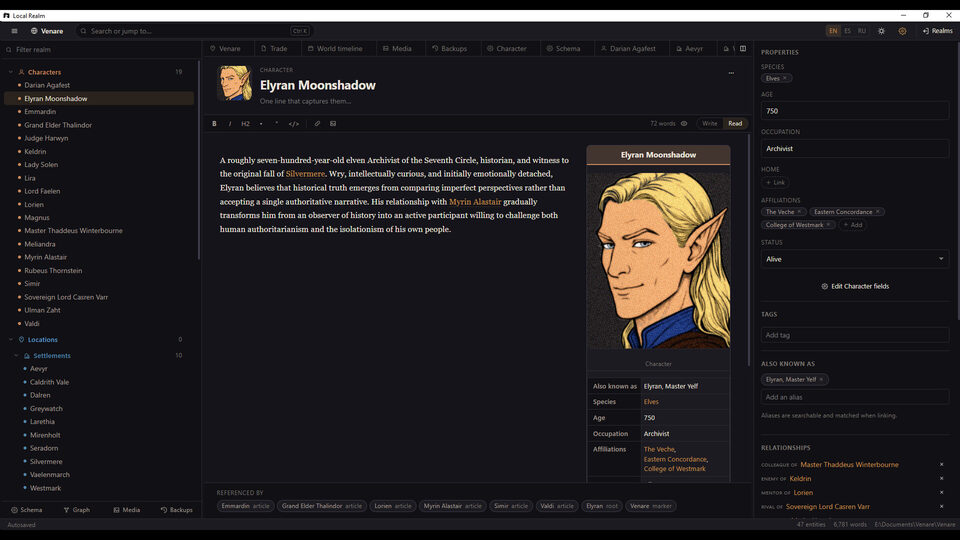
Local Realm is built around interconnected entries rather than isolated documents.
Create a character once and reference them across locations, factions, events, timelines, maps, relationships, and written material. Rename or update that character later, and their connections remain intact.
Use references, backlinks, tags, aliases, and relationships to turn your setting into a navigable knowledge base.
Create your own entry types, such as characters, nations, cities, planets, species, religions, corporations, starships, magic systems or historical events. Define custom properties for each type, including text, numbers, dates, images, categories, and references to other entries.
Use interconnected tools for: Interactive Maps, Timelines, Relationship Graphs and Relationship Trees.
Keep your lore close while writing by organizing stories into chapters, track drafts and notes, and open relevant world entries alongside your manuscript instead of constantly switching between applications.
Changes in version 1.1:
Zoom speed in Trees and Maps updated!
Manuscripts: the title now has Rename and Delete buttons. Deleting asks first, closes the manuscript’s open tabs, and says a snapshot in Backups can bring it back.
Notes: a Rename button next to the delete button. The tab title updates too.
“Child of”: the relationship menu now offers every one-way relationship from both sides: “Child of”, “Student of”, “Vassal of” and so on.
Family-tree layout: trees with family relationships now lay themselves out as a family tree: parents a row above their children, and siblings side by side; spouses and partners next to each other; parent-to-child lines are right-angled connectors.
Closing tabs: right-click any tab for Close / Close other tabs / Close all tabs.
Ctrl+B no longer collapses the sidebar when the editor uses it for bold.
More formatting: H1 / H2 / H3, strikethrough, numbered list, text colour (8 colours) and Word-style tables.
Deleting trees: next to the tree’s rename button. Entries and their relationships stay; only the tree goes.
Several species per character in new realms.
Undo deletions: “Deleted X” with an Undo button, Ctrl+Z, and a new Recently deleted list in Backups that keeps deletions for two months.
One right-click menu everywhere: Open, Rename, Duplicate (for entries), Delete.
Drag and drop to change type: drag an entry in the sidebar onto another type’s heading and it gains the new type’s fields.
Source: Steam