
Deck Shelves has been released in version 3.4.0.
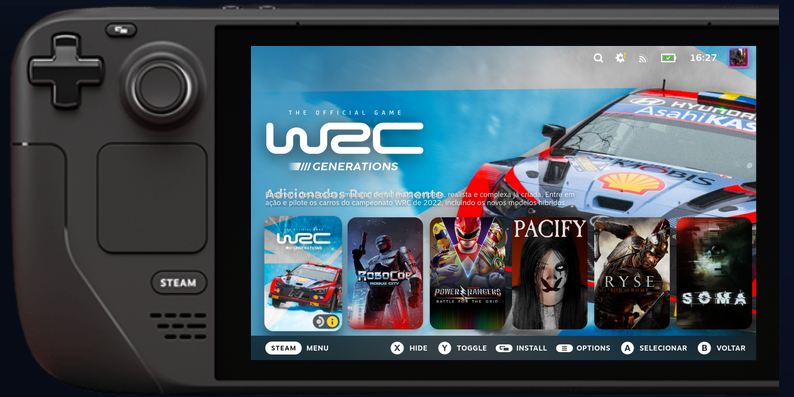
Deck Shelves is a Decky plugin that organizes the Steam Deck home screen into customizable, filterable and sortable shelves.
This update brings an experimental Quick Access tab of its own, lists for pinned games, play history, queues and custom tags, controller-based shelf reordering and Update actions in the game menu. Games hidden in Steam now stay off your shelves, plus numerous bugfixes.
- The Quick Access tab stays on after the restart it asks for: turning the own tab on and choosing “Restart now” no longer brings it back switched off, and a setting changed right before Steam restarts is no longer undone at the next start.
- Games waiting for an update update instead of launching: on a game with a pending update, the View button and the game menu now start with Update, as in Steam’s own menu, and the “Update pending” filter also finds games whose update is required.
- Showcase mode stops on any input: the keyboard, the mouse and the Deck’s touch screen now stop it as the controller does, and it no longer starts while you are using them.
- Turning the plugin off and on in Decky Loader works: Deck Shelves comes back right away instead of staying stopped until Steam restarts.
- The menu button behaves normally with “Use shelf as Recents”: it opens Deck Shelves’ menu only on the replaced row and on Deck Shelves cards; everywhere else Steam handles it.
- Settings from older versions load cleanly: shelves saved with old on/off flags no longer cause a validation error at every start.
- Reordering by touch or mouse keeps every move, and Steam’s logs no longer fill with a navigation warning.
- “Add to shelf” in every game menu: Steam’s library menus keep the plugin’s entries while the menu redraws, and no longer lose them on the first menu after Steam starts when other menu plugins are installed.
- Store game names read correctly: names with “&” no longer show as “&” on online shelves, and such games are matched to your library when owned games are hidden.
- “Use shelf as Recents” works on the Steam Deck’s beta client: Steam’s Recents row shows your first shelf, keeps the focus when its games change, and goes back to Steam’s own games as soon as you turn the option off.
- Add a game to a hand-ordered smart shelf from the library: the library card’s menu now lists smart shelves that keep a manual order, for adding and removing.
- Games you hid in Steam stay off your shelves, as in Steam’s own library: shelves built from a library tab or a collection leave them out (a shelf on the Hidden tab, or filtered to “Hidden only”, still shows them), and smart shelves without a visibility condition (the ones you created before 3.3.4) gain the same visible “Exclude hidden” condition new ones have - once; remove it afterwards and it stays removed.
- Hide a game on a smart shelf too: the card’s X button and the game menu’s Hide now work on smart shelves, and so does removing a game you added to one.
- The refresh card reshuffles every time: on the Roulette and any shelf in random order, each press of the refresh card or of the shelf’s Refresh action gives a new order.
- Shelves in the right place on the beta client’s Big Art home: the current-game row is now recognised in every language and the shelves sit right after it.
- Safe mode catches a home that fails every other start: the shelves switch off when the home screen failed to finish loading on three of the last six Steam starts; leaving safe mode starts the count over.
- Better bug reports: System information and the pre-filled bug report now say how the session booted (origin, phase timings, watchdog verdict, long tasks, seeded cache), warnings and errors always reach the Diagnostic log, and an empty wishlist shelf always says why there.
- Lighter visibility rules: performance and peripheral checks behind visibility rules are answered from a short-lived backend cache instead of re-reading the system on every evaluation; System information still reads the hardware live.
- Shelves placed right in every Steam language: the Home now recognises Steam’s own rows and tabs in any language, not only English and Portuguese.
- Game pages open with the focus on them: opening a game from the Home no longer leaves its page with nothing selected.
- Tags stay on the card you touch: discount and “New” tags no longer vanish from a card you touch or point at with a mouse.
- Shelf look settings and global ones work together: the global section only overrides what you set there, every global choice can go back to “Per shelf”, and a reset button returns the whole section to its defaults.
- Smart shelves use their own settings: the logo, description, layout and hide options and the auto-pin and auto-collapse rules you set on a smart shelf now work on the Home, the same as on a regular shelf.
- Game names line up with the card: centre and right alignment now match the card exactly, and game info shown above the card follows that alignment without leaving the screen.
- Highlight as many games as you like: shelves with six or more highlighted games no longer show empty spaces where cards should be.
- The Installed filter and tab are right for non-Steam games: Unifideck’s games count by their real install state with or without its collections, manual shortcuts, Heroic and emulators keep their own, and Proton / runtimes stay out of the Installed tab.
- Back from a game page, the focus returns to the same game and shelf, also when that shelf is further down the page and still loading, and scrolling sideways no longer jumps to another shelf.
- The wishlist shelf fills after a slow start too. A slow first answer from the backend no longer leaves it empty for ten minutes.
- The Steam menu and Quick Access open again while a game is running. The Home no longer pulls the controller focus back to a shelf card behind the game, and it runs no timers at all while a game runs - non-Steam shortcuts included - while the screen is off or while the device sleeps.
- Game info above the cards no longer repeatedly rebuilds its own label. Late-arriving titles and status changes still update, and toggling the option back on restores the label.
- Smoother controller navigation on custom Home shelves. Remove a focus-border adjustment that could repeatedly recalculate styling across the whole Home screen. Steam’s native focus border is retained; the Recents replacement and Round Compatibility setting still work as before.
- A “Show or hide settings” row under the master toggle opens or closes the quick-settings sidecar, the same panel the double dpad-right opens, for anyone who prefers a tap. The sidecar is titled “Show or hide” in a tab header, and Ctrl+Shift+S opens it by default.
- Quick Search lands on the game every time, including games further along a row or on a shelf below the fold, and reopening it keeps the previous text selected instead of appending to it.
- Pinned games, play history, queues and custom tags now work. Once a shelf, smart shelf, saved filter or profile uses one of these sources, the game menu of a shelf card gains a Lists submenu that pins a game, queues it for this session or until you play it, and edits its tags; play history fills by itself, and Parser categories reads the categories your ROM manager or launcher integration gave each shortcut. Profile triggers now keep the settings you change while they are active, and the shortcut editor takes up to three buttons and can be cancelled.
- Typing in Quick Search with the on-screen keyboard works again, and profile triggers are more dependable: switching them off restores your previous settings, they survive a restart, and they wait for real readings before acting. Update notifications can now be muted like the other areas.
- Fixes for profiles, sync and shortcuts. Linked profiles keep applying their shelves after a restart; cross-device sync keeps your latest profile and saved-filter edits and, with a different profile active on each device, one device’s look no longer overwrites the other’s; keyboard shortcuts keep working in long sessions; Quick Search no longer pops up during a game; a back-grip shortcut no longer makes another shortcut fire twice; turning off the sidecar’s button shortcuts now sticks.
- Safer settings. A damaged settings copy can no longer replace your last good backup, exports are written safely, and turning the screensaver off after a factory reset gives Steam back its own idle timeout.
- A bit lighter in the background. Features you don’t use (friends, launchers) no longer keep polling, and update downloads are checked more strictly.
- Reorder shelves with a controller row by row: in the Quick Access lists, A on a shelf’s name grabs it, the D-pad moves it, A saves and B puts it back, with those buttons shown in Steam’s button bar while the row is held. Touch and mouse dragging work as before.
- Games without artwork look like they do in Steam: when a cover can’t load, the card shows Steam’s own dark tile with the game’s name.
- Deck Shelves’ own Quick Access tab was rebuilt (experimental): under Decky Loader you can turn it on to get Deck Shelves as its own tab right after Performance; restart Steam after enabling. If another host already shows a Deck Shelves tab, that one is used instead.
- Under the hood, the home-screen rendering code, the plugin’s startup, the library code that builds every shelf and the game-menu code were reorganized into smaller pieces, with no change in behavior - verified on a real Steam Deck. Reloading the plugin now also cleans up its Settings page route.
- Release builds are a little leaner: diagnostics meant only for a debugger now stay in development builds. Nothing visible changes.
Source: GitHub