For the city buiilding simulation Cities Skylines a huge Patch 1.9.0 and a new Steam. Description Green Cities DLC:
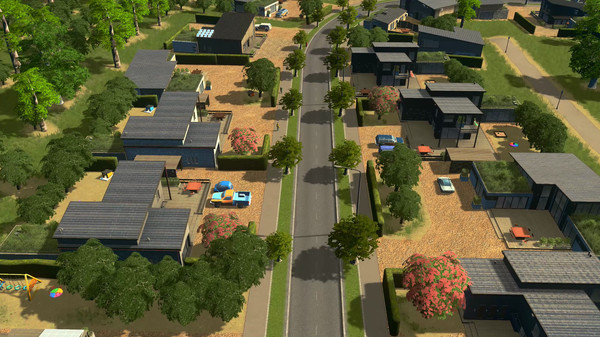
Cities: Skylines - Green Cities is a new expansion for the city-builder from Colossal Order, adding new ways for players to build earth-friendly towns. The expansion adds 350 new assets to the core game, adding a massive selection of new visual options, complete with eco-friendly buildings, organic shops, electric vehicles, and new services designed to make pollution a quaint notion of the past. Players can create more diversified cities, or go completely green as the urban population grows. New in-game services and buildings arrive alongside revisions to noise and environmental pollution, making the skies safer for Chirper at last. And that’s just the tip of the iceberg, with exciting new features such as: New Eco-Friendly Buildings, New specialization buildings, new alternative service buildings, new unique buildings, electric cars, new parks – 350 new assets in all giving a unique new look to Cities: Skylines New specialized options for all city zones, plus leveled-up specializations for the first time in Cities: Skylines 3 new scenarios, 4 new policy options, and a new Monument to make your friends Green with envy Of course we’ve included a new hat for Chirper
Description Patch 1.9.0:
Cities Skylines base game Electric cars for citizens Noise Pollution overhaul 3 new parks Tropical Garden Floating Cafe Fishing Island Info view toggling + info view for district painting New trees Asset Editor Road modding tool Floating building creation Train track intersection rules Need icon settings Increased maximum building LOD atlas size because automatic downscaling loses DXT compression Added placeable European theme buildings to other themes & vice versa when European / vanilla style is enabled Added rain effect on glass material Vehicle Info Panel now expand with long vehicle names to some extent Fixed: Noticeable shadow acne glitch on assets within camera view during dusk/dawn Fixed: “Add style” button is hard to use when using DE, FR, PL, PT, ES and RU Fixed: Reset Configuration in MISC menu does not affect display settings Fixed: Paradox login won’t accept user’s passwords Fixed: Tooltip for Slope Terrain Landscaping tool has primary and secondary mouse reversed Fixed: Mac - Zooming out quickly while moving the view on the city’s border causes the view to go out of this border Fixed: Misleading fertile and forest resource placing in Map Editor Fixed: Mechanics of the Weather Probability sliders in the Theme Editor are unclear Fixed: Excessively long messages in Scenario Editor become fragmented when repetitively triggered Fixed: Map DLC requirement is not readable if map is selected in Content Manager Fixed: Cut off text in zone building info view in EN, ES, FR, PL and PT Fixed: Cut off text in district info view in DE, EN, ES, FR, PL, PT and RU Fixed: Overflowing string in Medical Center description in DE Fixed: Land value icon in district panel wrongly positioned Fixed: Text issue in PL Citizen Happiness and Outside Connections infoviews Fixed: Small overflowing text fix for DE Garbage infoview Fixed: Overlapping Hospital and Water Pumping Station description in DE, ES and FR Fixed: EU hospital description missing information about helicopter and helipad Fixed: EU Hospital short description missing information about helipad in all languages Fixed: Overflowing FR color label in transport lines overview panel Fixed: Bottom line of text in Ore and Oil Industry specialization is cut off in EN, ES, FR, Fixed: European Theme buildings text and tooltips are not localized in Chinese Fixed: Overlapping policies text in Big Town Milestone panel in RU Fixed: Cut off new unlocked policies and specialization text in Milestone Panel in DE and RU Fixed: Base game industry specialization description syntax in DE is inconsistent with other languages Fixed: Description of Paint and Erase ‘Districts Painting Tools’ are cut off in DE Fixed: Typo in lightning storm chirp Fixed: ‘All conditions met at the same time’ text is cut-off in PL scenario win/lose conditions header Fixed: Some map names are not localized in DE Fixed: Weekly tourist visits info overlaps with other parts of the district info screen in PL and PT Fixed: Uploading an asset to workshop sometimes causing the asset to become corrupted due to wrong format version in package header Fixed: Cathedral of Plenitude requirements text need to be more clear Fixed: Long district names are cut-off at the end while in-game Fixed: There is no confirmation when changing the “Resolution” or the “Aspect Ratio” in the editors Fixed: The text from the Advisor panel flickers when a notification is positioned over it Fixed: The description box when saving an asset is too small preventing the entire text to be displayed and should hold more characters Fixed: Advisor info text for districts is cut off for DE, FR and RU Fixed: Middle points of intersections causing false overlapping detection and preventing placement even if nothing is built there Fixed: Cannot create a new scenario while already inside the Scenario Editor Fixed: Editors do not update load availability immediately when disabling custom assets, themes, scenarios Fixed: When increasing size of Metro Station, the ground texture disappears when placing a tree or prop on the ground Fixed: Pavement Path have misplaced light source on light lamps when built on slope terrain Fixed: Painting Districts in Natural Resources map mode should be allowed Fixed: The user should have the option to toggle between the “white” and the “normal” view when building a new building Fixed: Missing public transport line tooltip preview when switching / hovering over different transport line thumbnail Fixed: Building elevated road and tracks over zoned buildings not highlight removed zone grid Fixed: Unable to easily relocate some of the public transport buildings if parts of it overlap the original location Fixed: Opening Bulldozer while relocating a building causes tooltip to get stuck Fixed: Weather Probabilities percentage number shows 100% despite slider being set at 0% Fixed: Transport tool getting messed up when deleting the line that is currently being edited Fixed: Duplicate prefab errors when having the same pillar in multiple elevations Fixed: Keymapping for Toggle Snapping keys doesn’t reset after using “Reset Key Mapping” option
The complete changes (for all DLCs) are listed in the announcement on Steam.